Host Intel That Updates Itself

[ 2025.10.03 ]
TAGS: #release #community #rtfmv2 #Client
Host Intel That Updates Itself
CLICK_IMAGE_FOR_FULL_VIEW
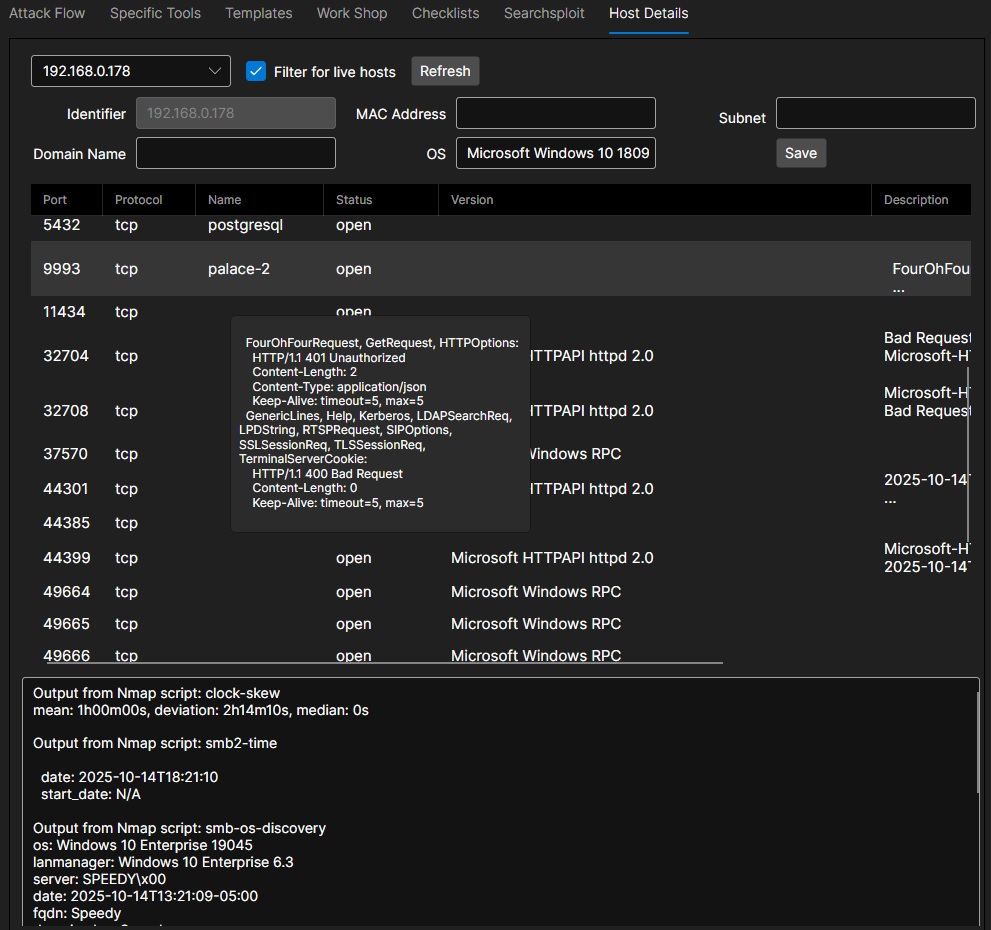
RTFMv2’s Host tab was built to give operators a live dossier for every system they touch. As your discovery jobs run, the host picker at the top quietly fills itself with new targets and, by default, shows only the ones that are currently alive perfect for fast triage during an engagement. One click refreshes the list, and single-host operations even hide the picker altogether so the tab stays streamlined.
Once a host is selected, its core identity data identifier, MAC, subnet, domain, and observed OS snap into place automatically. Analysts can tweak any of those fields as fresh intelligence arrives and save the updates back to the session without jumping into a database.
The centerpiece is the services grid. Ports, protocols, service names, states, versions, and descriptions are laid out in a sortable table that stays in sync with your enumeration results. Hover over any row and the full probe output appears, so details like HTTP headers or SMB fingerprints are just a glance away. A right-click on a service opens a context menu tailor-made for red teams: re-run the scan, append the banner directly into your notes, kick off an attack template against that exact port, or send the fingerprint to the built-in AI adviser for next-step ideas. There’s also a one click “Scan Host” command that chooses the right enumeration profile single system deep scan or broader ping sweep based on the host you’re viewing.
At the bottom, a scrollable notes pane keeps analyst commentary, pasted script output, or checklist reminders bound to the host record. The “Print to Notes” action from the service menu drops findings straight into this area, so you can build a narrative of the target as you work. The result is a living, auto-populated dossier: hosts appear as soon as they’re discovered, services carry their full context, and every action you take rescans, template executions, AI calls stays tied to the machine you’re investigating.